XuTerm: Ultimate Mobile Terminal Access your servers anytime, anywhere with XuTerm — a powerful, privacy-focused SSH/MOSH terminal for Android and iOS, built for developers and sysadmins.
Key Features:
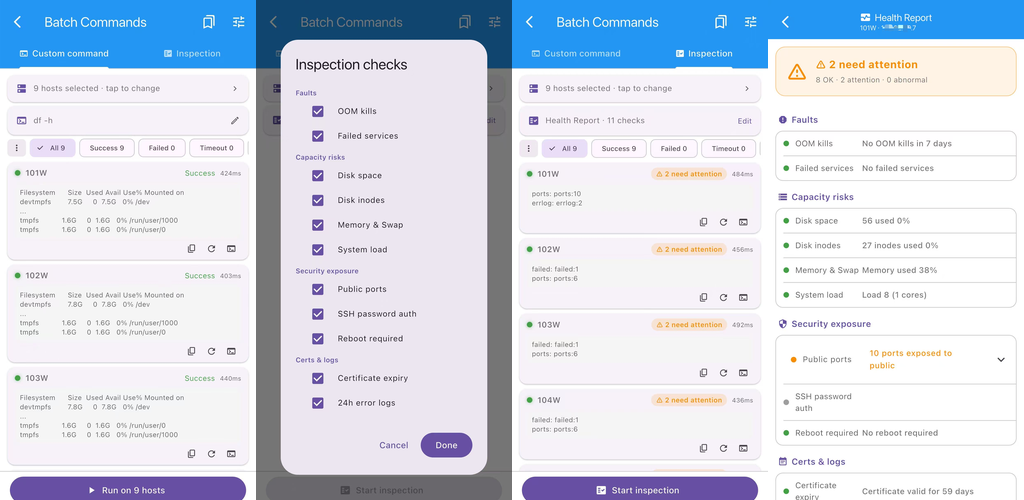
- Batch commands & host health reports — manage multiple servers in one go.
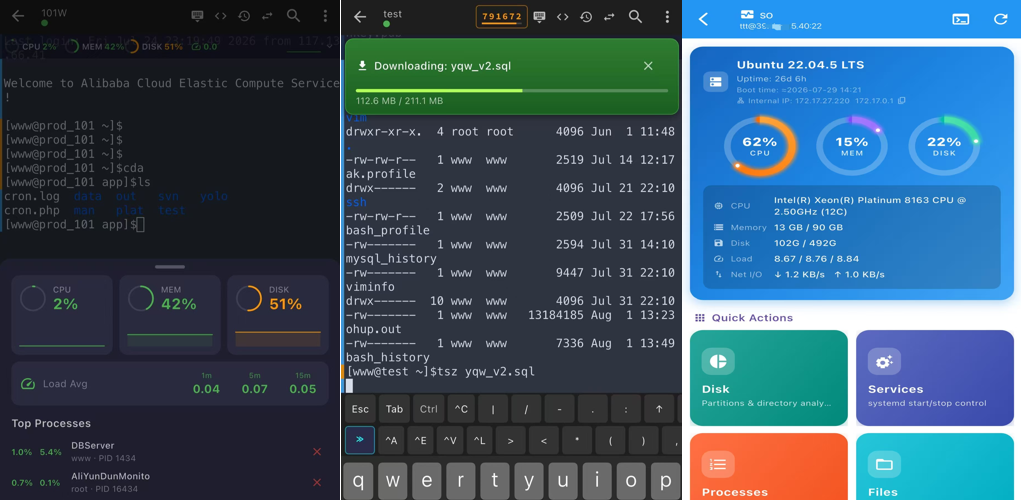
- Added SSH visual management features: system summary, status, disk, processes, services, SFTP, Docker, rsync, firewall, crontab, system logs
- Native TOTP 2FA token manager with live session verification codes
- Auto-fill saved credentials for sudo privilege prompts
- Preview PDF/XLSX/PNG/MD inline within terminal
- Native trzsz file transfer with resume
- Enhanced Mosh for seamless network roaming
- Native tmux integration (split panes, multi-windows)
- Built-in SFTP browser & remote editor for configs, code and scripts
- Biometric protected keys, local encryption
- Session persistence, no lost work
- Custom themes & full dark mode support
- Vertical marker bars to distinguish input commands and output for easier log navigation
- Progressive layered real-time server monitor for CPU, memory and load average with sparkline trends
- Compute file hash inside SFTP browser; remote calculation preferred with local fallback
- Quick shell snippet library with smart cursor positioning for fast command assembly
- Added SSH key & secure password generator, plus handy dev‑ops toolkit with DNS, WHOIS, SSL inspector, formatters, QR‑code tools and ASCII tools. Added regex tester and JWT parser & validator.
Why XuTerm?
- Cross-platform support for Android & iOS
- Zero data collection, fully privacy-oriented design
- Continuous iteration with regular feature updates Perfect for system administrators, developers, and DevOps engineers who need secure, convenient, and fully functional mobile remote server access.